How to Redeem Chiikawa Incremental Codes
Shop → Enter your code here → Redeem after the tutorial.
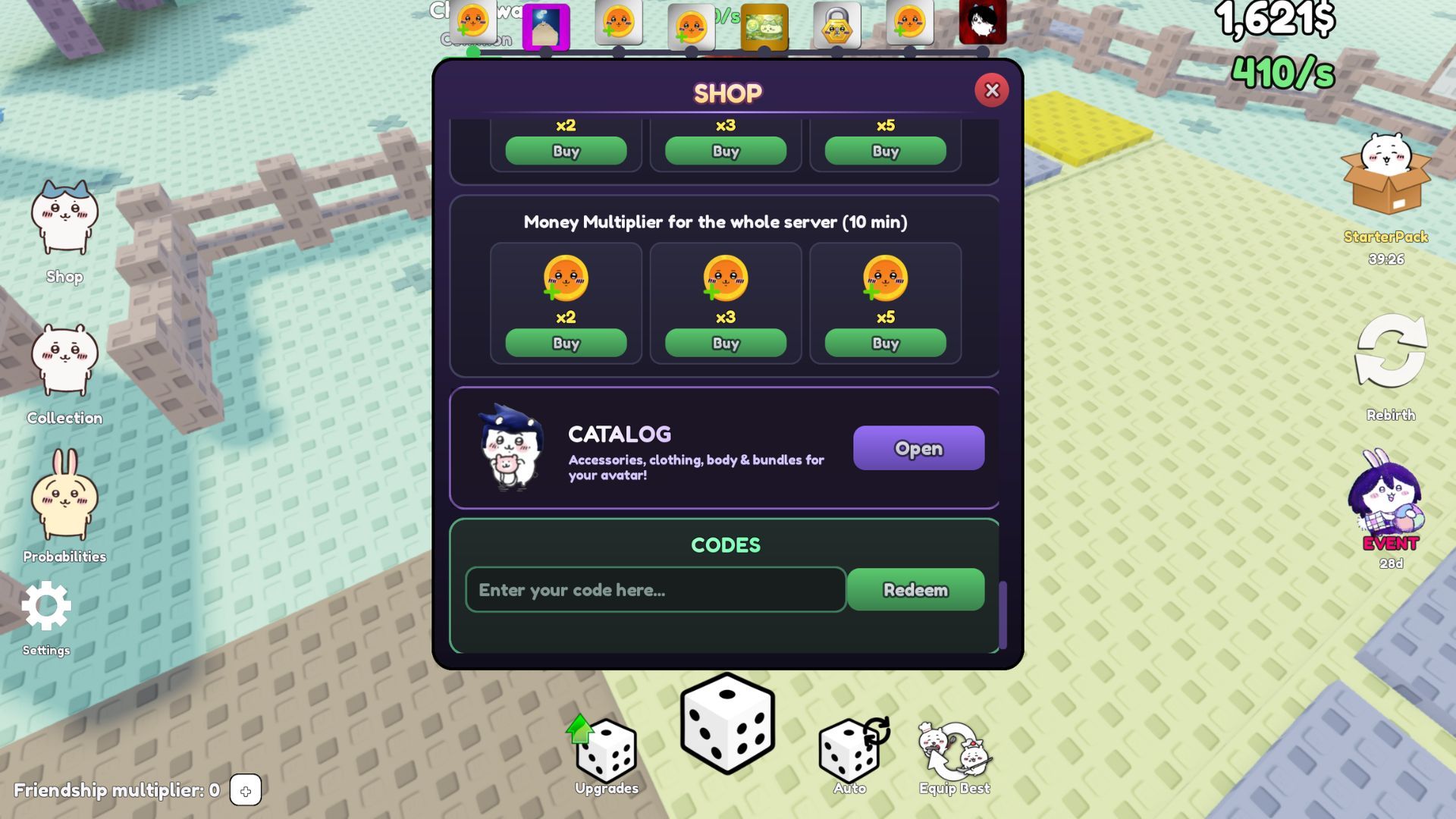
Redeeming codes in Chiikawa Incremental (Roblox: Roll for Chiikawa [RNG]) is simple once you know where the Shop hides the input box. This guide walks through every step on PC and mobile, explains common failure messages, and shows what to do with rewards after they land in your collection. Keep the Codes Hub open in another tab so you can paste active codes without typos.
Codes are one of the strongest early boosts in this incremental RNG collector. Free Secret units from strings like secret, berserk, and death note can leapfrog hours of average rolls. Treat redemption as part of your login routine alongside placing earners and checking the Comics Event.
Before you redeem
- Launch the real experience: Roll for Chiikawa (place ID 79237098587493).
- Finish the tutorial. New accounts often cannot redeem until the intro flow completes.
- Stay online long enough for UI buttons to load — do not spam click during teleport.
- Copy codes from the Codes Hub exactly, including spaces.
Step-by-step (PC & mobile)
- Look at the left side of the screen for the Shop button and open it.
- Find the text field labeled Enter your code here.
- Paste or carefully type the code. Examples with spaces:
death note,the cake is a lie,viva mexico,double p. - Press Redeem.
- Wait for a success toast or inventory update. Close the Shop and confirm the new Chiikawa appears in your collection.
- Place the unit if it beats anything currently in your base slots — see Best Earners.
Repeat for every working code in one sitting. There is no benefit to saving codes; they expire.
Video walkthrough
The embedded video above shows a live redeem flow so you can mirror button positions if your UI scale differs. Watch it once, then use the written steps as a checklist while you paste from the hub table.
Active codes checklist
Cross-check against the hub table (November 2026 working list — all can expire):
| Code | Typical reward |
|---|---|
secret | ME (Secret) |
berserk | Peter Griffith (Secret) |
death note | Light Yagami (Secret) |
luv4all | Chiikawa |
usakeychain | Keychain |
Isaac | the Isaac |
double p | Peso Plumo |
the cake is a lie | Box |
viva mexico | Mexican Mythic |
Redeem Secrets first. Deep lore and income notes for those units live on Secret Code Rewards. Flag viva mexico if trackers disagree — still try it once.
Troubleshooting
Invalid / expired — The promotion ended or you mistyped. Recopy from the hub. Remove extra spaces at the ends but keep internal spaces.
Already redeemed — Codes are generally one per account. You will not get duplicates.
Nothing happens — Rejoin the server, finish any remaining tutorial prompts, and try a different code to see if the system responds at all.
Wrong game — Copycat experiences exist. Confirm the Roblox title and place ID via Official Links.
Mobile keyboard issues — Paste from your notes app when possible. Landscape mode can make the Shop field easier to see.
After a successful redeem
- Open your collection and favorite or note Secret rarities.
- Replace the weakest placed earner if the new unit wins on cash — Tier List Hub.
- Spend the accelerated cash into Luck / Roll Speed or slots — Base & Cash.
- Continue the day-one plan in Getting Started.
- If you automate later, scripts do not redeem codes for you reliably — keep doing this manually (Scripts Hub).
Habits that prevent missed codes
Join the Discord from the Links hub, enable announcement pings, and redeem within minutes of a drop. Event launches (Comics Event waves) often ship with new strings. After redeeming, skim Updates Hub so you know whether the code ties to a limited banner.
If a friend is stuck, send them this page plus the Codes Hub rather than a screenshot of a single code — lists go stale, the hub stays current.
Related pages
- Codes Hub — full working table
- Secret Code Rewards — why ME / Peter Griffith / Light Yagami matter
- Controls — broader UI map including Shop
- Getting Started — what to do in the same session after redeeming
Master this flow once and every future code takes under thirty seconds. That speed matters when Secrets are on the line.
Frequently Asked Questions
Quick answers about codes, rebirth, earners, and base growth.
Where is the code box in Chiikawa Incremental?
Open the Shop button on the left side, then use the field labeled Enter your code here and tap Redeem.
Do I need to finish the tutorial first?
Yes. Complete the tutorial prompts before expecting codes to redeem successfully.
Can I redeem the same code twice?
Usually no. Each code is limited to one successful redeem per account.
Why does death note fail?
Include the space between the words and match spelling exactly. If it still fails, the code may have expired.
Do redeemed units need to be placed?
They are added to your collection; place them manually (or with auto-place scripts) to earn cash.